In today's information-driven business landscape, a knowledge management platform is essential for organizations seeking to maximize efficiency, consistency, and accuracy. This is especially true when teams manage large volumes of content and collaborate on complex documentation. These include proposals, RFPs (Requests for Proposals), security questionnaires, and due diligence documents.
But what does a knowledge management platform actually do? How does it add value, and what pains or limitations should users be aware of? Drawing on the context of leading solutions such as Responsive (formerly RFPIO) and its peers, this article explains the core functions, benefits, and real-world challenges of these platforms.
What is a knowledge management platform?
A knowledge management platform is software designed to centralize, organize, categorize, and enable easy retrieval of institutional knowledge. This includes answers, templates, documents, and Q&A pairs. In sales, proposal management, and RFP response, knowledge management platforms are the backbone that enable teams to quickly find and reuse content.
They ensure accuracy, maintain compliance, and support collaboration across multiple contributors and stakeholders.
The main idea is simple: when an organization has dozens (or thousands) of responses to RFPs, security questionnaires, or client queries, a knowledge management platform acts as the "single source of truth." It ensures that no one needs to start from scratch or guess at answers. It enables subject matter experts to contribute to, update, and curate information efficiently.
Key functions of a knowledge management platform
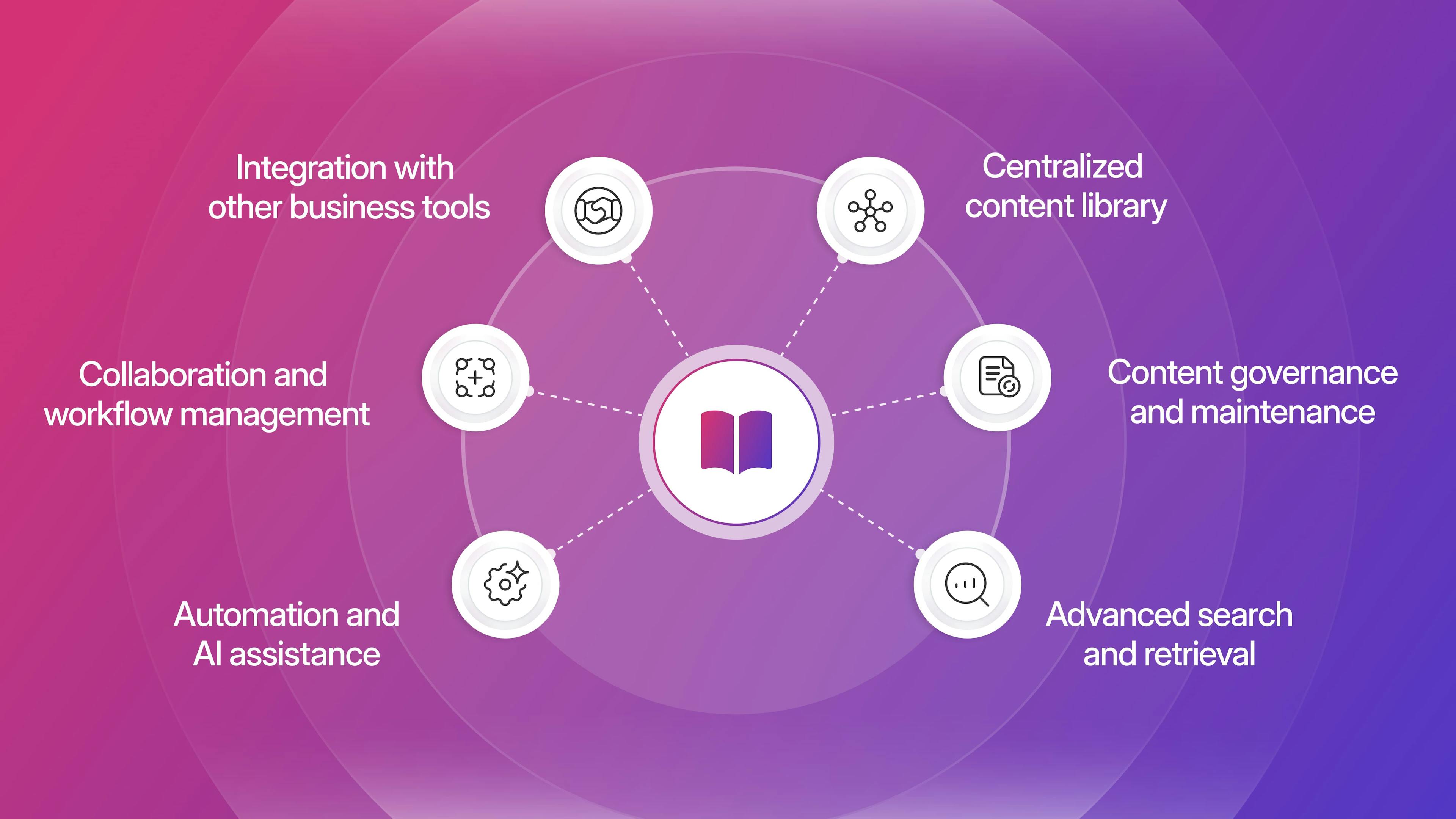
At their core, knowledge management platforms cover six major areas of functionality:
1. Centralized content library
A primary function is to store all approved content in one place. For instance, a proposal team can save their best answers to standard RFP questions. This makes them readily available the next time a similar request comes in.
This library contains Q&A pairs, product information, metrics, and formatted sections. This makes it easy to reuse high-quality content. For growing organizations or teams spread across regions, a central library reduces duplication of effort. It ensures everyone uses the latest, approved messaging.
2. Collaboration and workflow management
Knowledge management platforms power collaborative work. They enable multiple contributors to work on responses in parallel while tracking progress and managing assignments. Contributors include sales teams, subject matter experts, and compliance reviewers.
These tools typically offer permissions, commenting, and workflow automation for reviewing, approving, and updating content. This is crucial when deadlines are tight, and input from multiple departments is required.
3. Advanced search and retrieval
When it's time to answer a question, users rely on the platform's search engine to quickly locate the most relevant content. Effective search tools let users enter keywords or phrases and filter results by tags, collections, or owners. This helps them find specific answers quickly.
Filtering and sorting features further refine results. This is vital as content libraries can contain thousands of entries.
4. Content governance and maintenance
Long-term value depends on keeping the content accurate and up to date. Knowledge management platforms provide tools for curating, reviewing, and maintaining content. These include tracking usage, flagging outdated entries, assigning content owners, or sending reminders for periodic review.
Some platforms include analytics and scoring to identify the most- and least-used responses. This guides regular content audits.
5. Automation and AI assistance
Modern platforms increasingly include automation and AI features. This can involve automatic content suggestion, where the platform recommends the best answer based on past successful responses. It can include drafting new content with generative AI or using interactive assistants ("AI Chatbots") to find information faster.
These features can save hours by automating repetitive or initial-draft work.
6. Integration with other business tools
To maximize efficiency, these platforms often integrate with CRM, document management systems, communication platforms, and other business-critical tools. This streamlines the process of importing and exporting content. It ensures knowledge management fits seamlessly into the team's existing workflow.
Real-world example: Using a knowledge management platform in RFP response

Consider a large software company preparing to respond to an RFP from an enterprise prospect. The RFP includes hundreds of questions covering product features, security compliance, pricing, and implementation strategy.
Without a knowledge management platform, the sales or proposal team scrambles. They email subject matter experts, dig through past emails, reuse outdated spreadsheets, and rewrite answers from scratch for each new RFP. This results in inconsistent messaging, slow turnaround, duplicated effort, errors, and missed deadlines.
With a knowledge management platform, the team uses Responsive's Content Library to type keywords (e.g., "SOC 2 compliance" or "API integration"). They instantly pull up the latest approved answers, saving hours per RFP. The platform tracks which subject matter expert last updated each response.
It highlights content needing review and allows project leads to assign sections with automated deadlines. AI tools pre-populate the first draft or suggest answers, so contributors only need to fine-tune them. Collaboration takes place within the platform, with comments and approvals clearly recorded.
This centralized, collaborative process delivers faster turnaround, ensures message consistency, and reduces stress across the team.
Hypothetical scenario: Knowledge management in action
Imagine a fast-growing healthcare tech startup that has just started competing for larger contracts. After manually assembling RFP responses from various documents, the team decides to implement a knowledge management platform.
Within the first quarter, they upload existing RFP answers and tag each by topic, compliance standard, and region. When a new RFP request arrives from Europe requiring GDPR compliance details, the team searches "GDPR." They immediately access vetted responses reviewed by legal.
When the company's product undergoes a critical update, a content owner gets a reminder to review all responses tagged "Data Encryption." They update them in a single central location. Efficiency improves, errors drop, and new team members onboard faster because they have a complete knowledge base to reference.
Knowledge management platform next steps
A knowledge management platform, particularly in a proposals and RFP context, is more than just a database. Knowledge management platforms centralize institutional knowledge, support collaboration, offer advanced search and AI-driven automation, integrate with other tools, and ensure ongoing accuracy and compliance of content.
The right platform can transform response workflows, free up valuable team time, and ensure consistency and quality at scale. However, understanding both the strengths and limitations is essential for successful adoption.

Andrew Martin
Content Marketing Manager @ Responsive
Andrew Martin covers AI adoption, RFP strategy, and proposal management at Responsive, drawing on insights from Responsive's 2,000+ enterprise customer base and original research.